

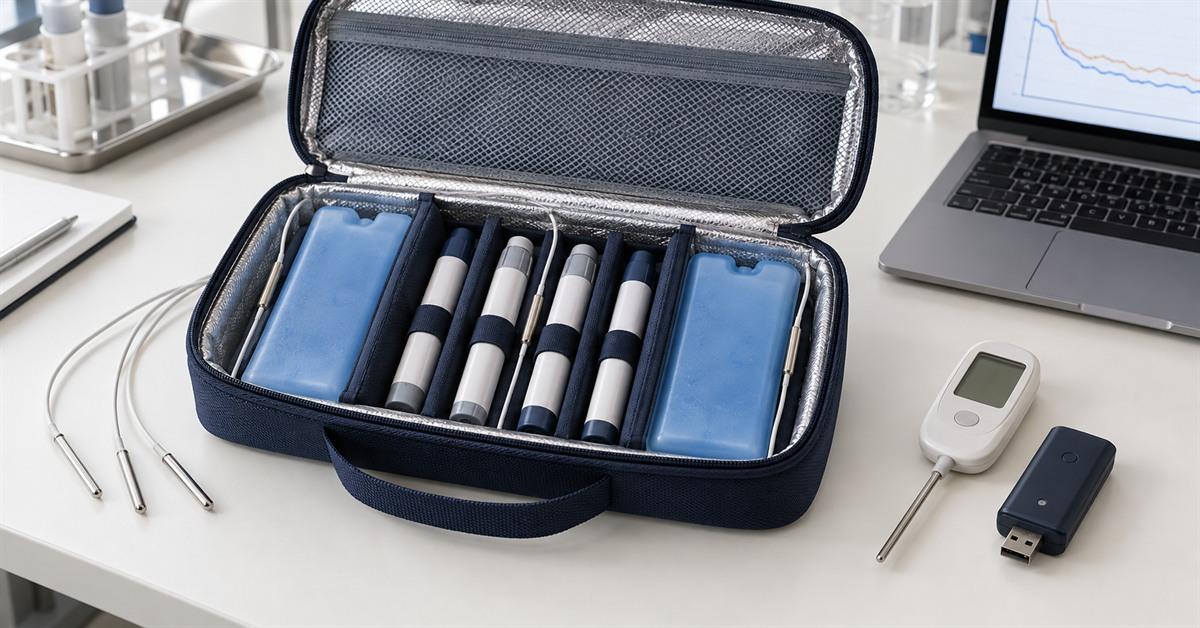
Briefly: The finished Pengtour insulin cooler uses a simple temperature display for real-time temperature monitoring. Factory sample testing uses a separate temperature recorder equipped with three air temperature probes, located on the left, between the four insulin pens, and on the right. The recorder and its probes are testing equipment; these three thermometers are not included in the finished cooler.
Some consultations confuse "thermometer," "temperature monitor," and "data logger," but they are not the same thing. Before providing a quote, we will analyze the product components and factory testing equipment separately.
The insulin cooler temperature display tells the user the sensor's current reading. It does not generate a three-point timestamp record for comparing sample structures.
What questions must the temperature display screen of an insulin refrigerator answer?
| Buyer Questions | Simple product display | Independent factory data logger |
|---|---|---|
| What is the temperature now? | Generally applicable | Generally applicable, depending on the model. |
| What is the lowest reading? | Only when the model stores the minimum and maximum values | It can be obtained from the recorded data. |
| How long did the case remain within the target area? | Based on the current readings, it cannot be confirmed. | It can be calculated from records with timestamps. |
| When did this hike take place? | Usually unknown | It can be seen on the temperature curve |
| Can the buyer compare the structures of the two samples? | Limited Liability Company | This approach is more useful when the testing method is controlled. |
| Can it provide travelers with quick readings? | Usually very convenient | Depends on the interface |
Providing only "temperature display" information on the quotation is insufficient. We need specific model number, dimensions, power supply method, display orientation, and supplier data sheet.
What background information must an insulin refrigerated data logger record?
When buyers review the factory CSV file, it must be consistent with the case version and test settings that generated it. We will record information such as coolant, freezing time, environmental conditions, probe location, recording interval, and unpacking procedure in the file.
Please refer to the cooling time article for detailed setup instructions for Pengtour. The simple display is a finished product. The separate data logger and three probes are factory testing equipment.
Why can the readings from an insulin cooler thermometer be misleading?
The screen displays the temperature at a sensor location. If the sensor moves from the cover to the side wall, the reading will change even if the housing and load remain the same.
In Pengtour's current four-pen test setup, three probes from the independent plant data logger are labeled L, C, and R. The middle probe is located between the pens, while the other two probes inspect the left and right sides of the loading compartment.
In this project, the applicable label for the buyer specifies an upper temperature limit of -30°C for insulin use. Timing stops when any of the three readings (L, C, or R) reaches 30°C. I recorded the lowest temperature value at each location on the same sheet of paper. Taking the average would mask which side of the container had the lowest temperature.
I won't blindly copy this LCR chart to the next box. I'll open its drug loading diagram and locate the drug closest to the gel pack, the drug furthest from the gel pack, and the center of the drug loading area. If possible, I'll also check that location through direct contact. A probe on the outside of the box records the actual amount of drug delivered by the test chamber.
Each probe is marked with the air, liquid, surface, or ambient temperature. Here, L, C, and R all measure air temperature. Therefore, this report will not be confused with data read from liquid inside the pen.
Why separate the case display and the test logger?
A simple display screen remains on the finished product cooler, showing the user the current sensor readings. The factory recorder performs another function. Its three probes allow us to compare insulation performance, gel pack location, or shell version, while its timestamped files are used to calculate the duration under given settings.
The sample file contains logger export data, setup photos, and temperature profiles. The screenshot on the chassis display only captures a single moment and cannot show the complete sequence stored in the factory logger file.
The UK National Health Service (NHS) treats maximum/minimum thermometers and continuous data loggers as distinct tools on its temperature sensor page . This project employs the same approach. The case study section is for quick user viewing only; individual loggers provide historical records for review alongside samples.
How does a display screen compare to a factory recorder?
Do not place the product display stand on the lid, place the data logging probe between the pens, and expect the two numbers to match. They belong in different locations.
For comparative testing, first mark the location of the sensor on the product display box. Place one original manufacturer's probe next to the sensor, being careful not to let them touch. Add the gel packet and pen, close the box, and record the readings of both probes simultaneously. Two additional original manufacturer's probes can be placed on the left and right sides of the medicine box, respectively.
Now we can observe whether the installed display follows the airflow next to its own sensor. We still use a separate recorder for the standard three-point test. We move the product sensor from the cover to the side wall and compare again. The previous readings only reflected the position of the cover.
What specifications must be included for the display screen in the product specification sheet?
The description "small digital thermometer" is too general and doesn't meet my needs. I need to know the manufacturer, model number, and external dimensions. The same instruction manual also specifies the installation orientation, temperature unit, nominal range, and nominal accuracy. Furthermore, it indicates the battery type, how the battery cover opens, and any switches that must be kept closed when the casing is open.
The drawings cover the display window, viewing angle, and housing mounting method. We will conduct visual and functional inspections on qualified samples. The humidity around the components will also be checked separately.
None of this information can replace the factory test page. This page lists the recorder, three probe positions, test intervals, test chamber conditions, load, gel pack preparation, and start/end rules. It also links to the original exported file.
When should the display screen be installed into the EVA cavity?
Before creating the prototype, we sketch the display window from the user's perspective. The recess behind the window must be large enough to accommodate the casing without obstructing the battery cover. We also allow space above the pen tip and observe areas where condensation might accumulate around the electronic components.
On the sample stage, I observed the screen condition of the phone case both vertically and horizontally. Next, I gently pressed the fixed edge to open the battery cover and then closed the top cover containing the battery. Before acceptance, I would record whether there was any moisture around the screen or the case.
The cross-sectional view also indicates the sensor locations. The sensor on the lid detects air around the lid. The sensor next to the gel pouch detects another part of the casing. If the display uses a separate probe line, the drawing shows its path, leaving a slight bend near the hinge. The probe also requires a fixed base to prevent it from moving during normal operation.
I also check the components inside the pen case when it's full. Four pens might leave enough space on the paper, but the tallest pen could press against the display housing when the lid is closed. A deeper housing could also cause the same problem from the other side. We close the compliant items without forcing the zipper before opening it to check the display window, securing the edges, and the battery cover.
What should be included with the sample?
Two different records are required.
The product component log covers the display screen installed inside the chassis. This log includes information such as the display screen's model, nominal range and accuracy, power supply, sensor location, and mounting method. We will take photos of the screen from the user's perspective, and then photos of the chassis cover or inner walls to demonstrate how the chassis is secured.
The factory test log covers the individual data loggers. The log includes the data logger number, the location of the three air probes, environmental conditions, recording intervals, prepared gel packs, the dosage of the four pens, and the original exported files with timestamps. We save the plotted graphs, setup photos, and the version of the sample kit used for this test in the same folder.
The two records were signed for different reasons. We will accept the installed display after checking the screen, installation, and basic functionality. The duration of temperatures below -30°C is taken from controlled factory operation and record documents, not from screen display data. In the finished chassis, the display is still a component subject to user spot checks.
For new projects, please attach the display datasheet and component dimensions to the chassis design brief . Before requesting a quote , please specify the pen load, gel pack details, target temperature, and required duration in the same brief.