

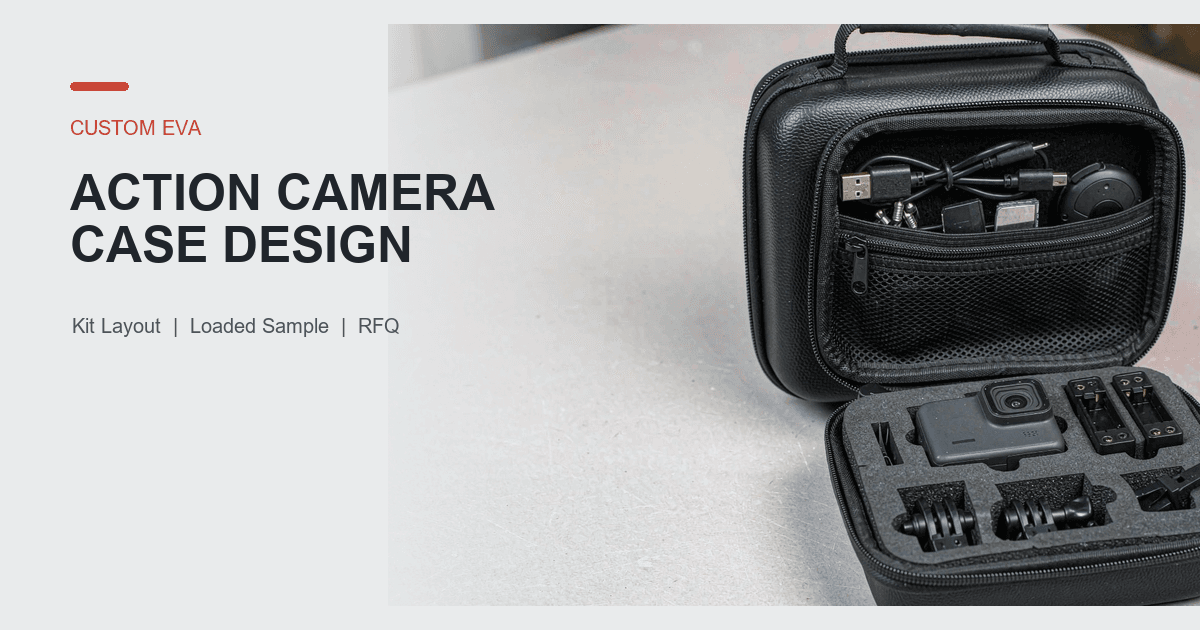
A custom EVA action camera case should be developed around one confirmed sales kit, not around a generic picture of a camera and several mounts. The camera body may be compact, but the complete load can include spare batteries, memory cards, a charging cable, a remote, mounting frames, adhesive bases, buckles, screws and printed instructions. Those items differ in shape, hardness, frequency of use and replacement rate.
For an action-camera brand, accessory company or sourcing team, the practical sequence is:
- Freeze the exact camera SKU, housing state and approved accessory list.
- Separate core equipment, fixed accessories, optional accessories and excluded items.
- Map the lens, screens, buttons, ports, battery door and mounting interface.
- Arrange the kit around camera removal, battery changes and memory-card access.
- Decide which accessories need fixed positions and which need flexible storage.
- Keep small loose parts controlled and hard parts away from exposed camera features.
- Review the lid load, zipper path, carrying direction and loaded balance.
- Approve the physical sample against the exact kit and document revision.
- Keep ordinary sample observations separate from formal performance evidence.
This process gives both sides a comparable RFQ. It also helps a supplier evaluate custom EVA camera cases without assuming that one foam layout can support every camera, housing and accessory bundle.
Freeze the Camera SKU and Saleable Kit
Start with the configuration that will actually be sold or distributed. A request such as "EVA case for an action camera and accessories" leaves the supplier guessing about the camera housing, number of batteries, charger, mounts and retail packaging.
Create a controlled kit list with at least these fields:
- Camera model reference, product revision and market SKU
- Camera dimensions and weight in the packed condition
- Whether the camera is stored bare, in a frame or in another housing
- Lens projection and any removable lens cover
- Front and rear screen locations
- Button, microphone, speaker, port and battery-door locations
- Mounting fingers, threaded interface or other raised features
- Battery model and approved quantity
- Memory-card type, adapter and approved quantity
- Charging cable, charger, remote and manual
- Mounts, buckles, screws, bases, straps and other accessories
- Retail box, labels, instruction cards and unit packaging
- Items that are optional or explicitly excluded
The finished production device is normally the strongest fit reference. A size-accurate model can support early development. Controlled drawings or 3D data may also establish geometry, but the buyer should identify the file revision and features that still need physical confirmation. The broader process for custom EVA case design from 3D models can support this input stage.
Do not combine several sales kits under one approval record without checking their differences. A basic kit may include the camera, one battery and a cable. A creator kit may add a remote, charging hub, several batteries and multiple mounts. The accessory count can change pocket depth, insert size, closing pressure and the outside dimensions of the case.
Divide the Kit Into Four Groups
A clear inventory helps the supplier choose between shaped cavities, modular sections and flexible pockets. It also prevents optional accessories from quietly becoming mandatory after the sample is approved.
Core Equipment
The camera, its normal housing and any required adapter belong in the core group. Each item needs a repeatable location and removal direction. The buyer should define which housing state represents the packed product.
Fixed Accessories
These are included in every saleable kit. Typical examples are one charging cable, a defined battery quantity, a memory card adapter, a remote or one standard mounting buckle. Fixed accessories can receive dedicated locations when their models and quantities are stable.
Variable or Optional Accessories
Adhesive bases, short and long screws, straps, clips and specialized mounts may change by bundle or market. A rigid cavity for every possible accessory can make the case too large and create empty unused shapes. The buyer should identify the maximum approved optional set and decide whether a removable module, divider or pocket is more practical.
Excluded Items
List items that do not belong in the case. This may include a selfie stick, tripod, large charger, tablet, phone or wet equipment after use. An exclusion list keeps the quotation and sample scope comparable.
This four-group method is more useful than asking for "as much capacity as possible." Unlimited capacity is not a measurable requirement. The approved item list and quantity define what the loaded sample must hold.
Map the Camera Before Drawing the Insert
An action camera should not be reduced to a maximum-length rectangle. Map the finished device and identify where ordinary support may be evaluated and where concentrated contact should be avoided.
Mark these features on the drawing or sample record:
- Lens and lens-cover area
- Front and rear screens
- Power, mode and shutter buttons
- Microphone and speaker openings
- Charging and data ports
- Battery and memory-card door
- Mounting interface and raised housing features
- Status lights and product labels
- User grip and finger-removal areas
- Surfaces that may accept normal support contact
- Areas that require project-specific clearance
The cavity, lining and retention method should follow the real geometry. The general method for EVA case dimensions and clearance can organize the measurements, but the loaded physical sample should confirm fit, removal and closing behavior.
A finger recess should follow the intended grip. If it sits beside the lens, presses a button or exposes an edge of a screen, the user may apply force to the wrong area during removal. Check the actual hand movement instead of selecting a recess only because it looks balanced in a drawing.
If the camera is stored in a protective frame or housing, measure and approve that packed state. A bare-camera cavity does not establish fit for a framed camera, and a larger housing can change lens projection, button access and removal clearance.
Build the Layout Around the Use Sequence
The internal layout should follow the order in which the kit is opened, checked and used. For many programs, the camera should be visible and removable before small mounts are handled. Batteries and memory cards may need faster access than accessories used only for a particular shooting setup.
Review the sequence step by step:
- Open the case in the intended direction.
- Identify and remove the camera without unloading the accessory area.
- Reach a spare battery and memory card.
- Find the cable, remote or charger without spilling smaller parts.
- Select the required mount, buckle or screw.
- Return each item to a repeatable location.
- Confirm missing core items through a visual check, if required.
- Close the case without forcing the lid or zipper.
A generic grid of foam openings may create many compartments, but it does not automatically create a useful workflow. A mount with an irregular base can catch under the foam edge. A long screw may cross into a battery position. A cable can spring out of a shallow recess. The buyer should review the exact kit in the order it will be accessed.
The broader guide to camera protective cases and EVA inserts explains the category. This article keeps the task narrower: one action-camera SKU, one accessory bundle and one loaded approval record.
Choose Fixed or Flexible Storage for Each Item
An action-camera case may use a shaped cavity, foam insert, molded support, divider, elastic loop, mesh pocket or zippered pocket. The right combination depends on item stability, quantity, frequency of access and the space available when the lid closes.
Use each component for a defined job:
- A shaped cavity or molded support can locate the camera body.
- A foam insert can give stable batteries, a remote or a charger repeatable positions.
- A divider can separate groups of mounts without fixing every individual shape.
- An elastic loop can retain a cable or slender tool when removal remains practical.
- A mesh pocket can organize light accessories when loaded projection is controlled.
- A zippered pocket can reduce migration of small screws, adapters and memory cards.
- A removable pouch can support accessory bundles that change by SKU.
- A printed item map can support packing and inventory checks when agreed by the buyer.
The EVA case foam insert guide covers the general insert decision. For this project, ask which items are stable enough for dedicated cavities and which items are likely to change during the product life cycle.
A fixed cavity is useful only when the item specification is controlled. If a battery charger, remote or mount is likely to change, a flexible section may reduce the impact of minor kit revisions. Flexibility still needs a defined maximum load and sample review. A deep pocket filled with hard accessories can press into the camera when closed.
Control Small Parts and Lid Load
Action-camera kits often contain several small parts: memory cards, adapters, thumb screws, buckles and short cables. These parts can migrate under a loose divider, collect in one pocket corner or move toward the camera during carrying.
For each small-item group, define:
- Item name and revision
- Approved quantity
- Packed dimensions
- Whether individual visibility is required
- Whether the item needs a closure
- Replenishment or replacement frequency
- Position when the case is carried upright
- Acceptable movement under ordinary handling review
Do not approve an empty mesh pocket and assume it will work when filled. Load the exact battery count, cable, remote, adapters, screws and mounts. Then close the lid slowly and review:
- Whether lid contents project toward the camera
- Whether a hard mount aligns with the lens, screen or button
- Whether small parts gather in one area
- Whether the pocket closure remains usable
- Whether the zipper closes without unusual force
- Whether the lining or pocket edge catches on an accessory
- Whether the loaded lid shifts the camera or insert
- Whether an item moves into another section when carried upright
- Whether the case reopens without loose parts falling out
Closing resistance is an ordinary sample observation. It is not a compression test, zipper-life test or proof of protection. Formal evidence needs a separately agreed method, sample condition and acceptance criteria.
Review Opening and Carrying Direction
The same kit can behave differently when the case is laid flat, held vertically or opened while hanging from a handle. The RFQ should identify the expected carrying and opening direction.
Check these points on the sample:
- Required opening angle
- Whether a hinge panel or divider stays clear of the camera
- Camera grip and removal direction
- Access to batteries and memory cards
- Visibility of small parts and mounts
- Zipper-puller location when open
- Handle, wrist strap or carabiner position
- Loaded balance in each intended carrying direction
- Behavior of pocket contents when the lid is raised
- Interaction between exterior labels and the opening direction
A compact case may use a wrist strap. A larger accessory kit may need a handle. Another program may omit external carry hardware because the case sits inside a backpack or equipment bag. Specify the actual task instead of adding every option.
Ordinary carrying checks do not establish a certified handle load, drop result, vibration result or transport performance. If formal evidence is required, define the load, duration, method, sample condition and reporting requirement separately.
Approve the Fully Loaded Sample
An empty shell or insert does not prove that the complete kit works. Approve the physical sample with the exact camera and approved accessory quantities whenever possible.
Use this review sequence:
- Confirm the case sample version, camera revision and kit-list revision.
- Load the camera in its approved housing state.
- Load every fixed accessory and the maximum approved optional set.
- Check camera support, lens/screen/button clearance and removal path.
- Remove and replace the camera through the intended hand movement.
- Replace a battery and access a memory card in the planned sequence.
- Remove and return the cable, remote, mounts, buckles and screws.
- Confirm that small parts stay in their assigned sections during ordinary handling.
- Close the lid slowly and review projection, resistance and zipper travel.
- Carry and reopen the case in each intended orientation.
- Check logo, color, labels, instructions, unit packaging and packing orientation.
- Record pass, conditional approval or revision needed for every line item.
The general EVA case sample approval checklist can hold the wider record. Attach an action-camera kit sheet that identifies the exact device, housing, batteries, cards, cable, remote, mounts, quantities, layout and sample version.
If a change affects the camera housing, lens projection, battery, remote, charger, mount set, insert, pocket depth, zipper path, material construction or packaging fit, evaluate whether a revised physical sample is required. An updated drawing may not reveal loaded contact, small-part migration or closing pressure.
This review confirms only the items observed under the agreed ordinary sample scope. It does not prove drop, shock, compression, water, dust, vibration, abrasion, temperature or transport performance.
Build a Comparable B2B RFQ
A useful RFQ separates confirmed product inputs from open design choices.
Camera and Kit
- Camera model reference, revision and market SKU
- Bare, framed or housed packed condition
- Physical sample availability or controlled drawing/3D revision
- Finished dimensions, weight and camera contact map
- Battery model and approved quantity
- Memory cards, adapters, cable, charger and remote
- Mount, buckle, screw, base and strap inventory
- Fixed, optional and excluded-item lists
Layout and Access
- Camera orientation and removal direction
- Lens, screen, button, port and battery-door keep-clear areas
- Battery-change and memory-card access sequence
- Fixed cavities, modular dividers, pockets or pouch preferences
- Maximum approved optional-accessory load
- Required opening and carrying orientation
- Visual inventory or item-labeling requirement
Materials, Branding and Packaging
- Outer material and color direction
- Lining and contact-surface direction
- Zipper, handle, wrist strap and hardware requirements
- Logo artwork, method, size and placement
- Labels, SKU identification and instructions
- Unit packaging, retail box and carton requirements
- Requested material or finished-product evidence, if applicable
Approval and Evidence
- Loaded sample contents and quantity
- Measurement method and project-specific acceptance criteria
- Approved reference sample and document package
- Formal test requirements, if any
- Revision and re-approval rule
- Target order quantity and destination for quotation planning
Avoid an RFQ that says only "hard EVA action camera case with foam and mesh pocket." It does not define the camera state, accessory inventory, variable mounts, contact map, access sequence, lid load or approval method.
How Pengtour Can Support an Action Camera Case Project
Pengtour can evaluate selected action-camera case projects using the actual product size, shape, opening, internal layout, insert or molded support, outer material, lining, zipper, handle, pocket, elastic strap, logo, packaging and sample requirements.
For an action-camera project, the review can focus on:
- The confirmed camera, housing and market-kit revision
- Lens, screen, button, port and mounting-interface clearance
- Battery, memory-card, cable, charger and remote positions
- Fixed versus variable mount storage
- Small-part migration and lid-pocket depth
- Opening, access and carrying direction
- Logo, labels, instructions and retail packaging
- Fully loaded sample observations and revision records
The final structure, materials, acceptance criteria, evidence scope, MOQ, sampling schedule and production schedule depend on the confirmed project. The buyer-approved physical sample and final specification package can be used together as production and inspection references, subject to agreed tolerances and acceptance criteria.
To start a project review, request a custom case quote with the camera model, housing state, accessory list, quantities, drawings or sample availability, layout task, artwork, packaging and required evidence.
Frequently Asked Questions
Can One EVA Case Support Several Action Camera Models?
A shared outer shell may be evaluated, but each camera and housing combination needs a compatibility record. Lens projection, screens, buttons, ports, battery doors and mounting features can differ even when maximum dimensions look similar. A shared platform may require separate inserts, labels or approved kit lists.
Should Every Mount Have a Dedicated Foam Cavity?
Not necessarily. Stable accessories included in every SKU may suit dedicated locations. Optional or frequently changing mounts may be better handled by a divider, closed pocket or removable module. The decision should follow the approved item list, access task, migration risk and loaded closure review.
Can a Supplier Develop the Case From Drawings or 3D Data?
Controlled drawings or 3D data can support early structure development. The buyer should identify the file revision, finished dimensions, packed housing state and unresolved features. A physical device or size-accurate model is useful for confirming actual fit, removal, contact and loaded closure before approval.
Does an EVA Action Camera Case Prove Waterproof or Drop Performance?
No. Material choice and ordinary fit review do not prove waterproof, IP-rated, shockproof, drop-proof or other formal performance. Any such requirement needs a defined finished-product specification, test method, sample condition, acceptance criteria and applicable evidence.